


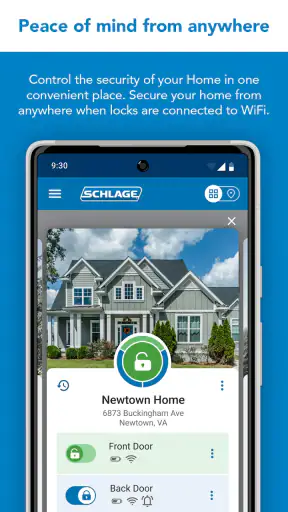
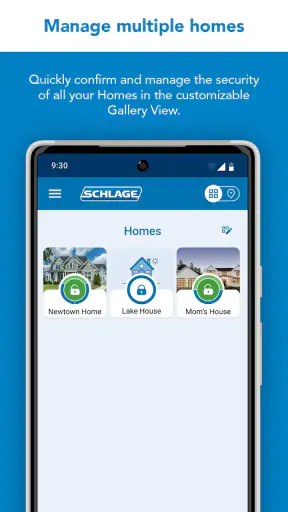
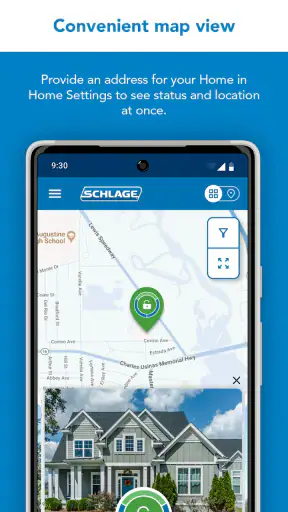
Managing a smart lock feels different from managing most household apps because the result is physical: someone can enter, or they cannot. I spent time looking at Schlage Home from that practical angle, especially how it fits into a shared home where several people may need access without everyone using the same phone. It is a free House & Home app from Schlage Lock Company, LLC, designed around Schlage smart-lock use rather than general home automation.
My first impression is that the app makes the most sense when it is treated as a companion to compatible Schlage hardware, not as a standalone home-management tool. If you already use a supported Schlage lock, the app can become the place where everyday access is organized. If you are simply looking for a broad smart-home dashboard, its narrower purpose may feel limiting. That distinction matters more than the attractive idea of controlling a door from a phone.
How it feels in a shared household
The most realistic use case is a home in which people arrive at different times. One person may leave early, another may return later, and a trusted visitor may need access without receiving a physical key. In that situation, the useful question is not just whether the lock can be controlled remotely. It is whether the household can agree on who should have access, how that access is handled, and what happens when circumstances change.
I would approach the app as a coordination tool. Before adding anyone, I would decide who owns the main account, which phone is used for initial setup, and who is responsible for changing access when a roommate moves out or a service visit ends. That small bit of planning prevents a common smart-lock mistake: treating digital access as casual when it has the same practical consequences as handing over a key.
A shared phone can work for a couple or a small household, but it is not the arrangement I would prefer. A single device makes the app easy to understand, yet it also blurs responsibility. If several adults need to use the lock, separate personal access is generally easier to manage than passing one phone around. It also avoids turning one person into the permanent gatekeeper for ordinary arrivals and departures.
There is another everyday scenario worth considering. Imagine a parent returning from work while a teenager arrives home first, or a housemate needs to enter while the primary account holder is away. The app is most valuable when the household has already decided what “normal access” means. It is less helpful if everyone expects the application to resolve disagreements about who should enter, when access should change, or whether a particular visitor is trusted.
That is my main practical takeaway: the software can support a household agreement, but it cannot replace one. The lock remains a security device, and the app should be handled with the same care as a key ring, even though access now appears on a screen.
What setup requires you to think about
Getting started with a smart-lock app is not simply a matter of installing it and tapping through screens. The physical lock, the phone, the account, and the home’s internet or connectivity arrangement all have to cooperate. I would begin close to the lock, with the hardware instructions available, rather than trying to complete the process while away from the door.
The account boundary is especially important. The person who performs the initial setup should be someone who will remain involved in the property. That might be the homeowner, a long-term resident, or the person formally responsible for the lock. Using a temporary guest’s account for convenience can create an awkward handover later, even if the app itself seems straightforward at first.
I would also keep the first setup deliberately small. Add the main user, confirm that the lock responds as expected, and only then think about other household members. This staged approach makes troubleshooting much easier. If something goes wrong after several people and devices have been added, it becomes harder to tell whether the issue comes from the lock, the account, the phone, or the way access was shared.
The app’s current version is 8.3.0, so I would keep it updated through the normal app-store process, while remembering that an app update does not automatically solve every hardware or network problem. Smart-lock reliability depends on the complete arrangement, not just the application package. A phone with a weak connection, a lock that needs attention, or a poorly planned account structure can still make the experience frustrating.
One useful habit is to test the arrangement before relying on it for an important arrival. I would check the lock from the usual locations around the home, verify that the intended household members understand their role, and keep a backup entry plan available. That is not a criticism of Schlage Home specifically; it is sensible practice for any digital access system. Phones run out of battery, people lose devices, and connectivity can be unpredictable.
I would not install the app first and buy hardware later without checking compatibility carefully. The application is tied to Schlage’s smart-lock ecosystem, and the value comes from the relationship between the app and a supported lock. Someone who expects it to operate as a universal controller for unrelated locks is likely to be disappointed.
Coordinating adults, visitors, and changing access
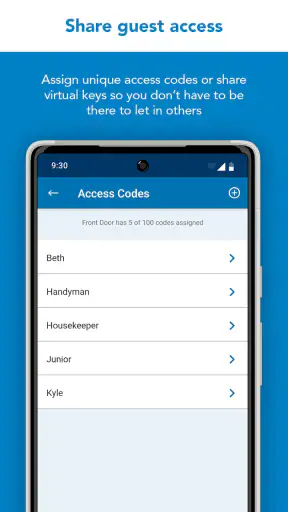
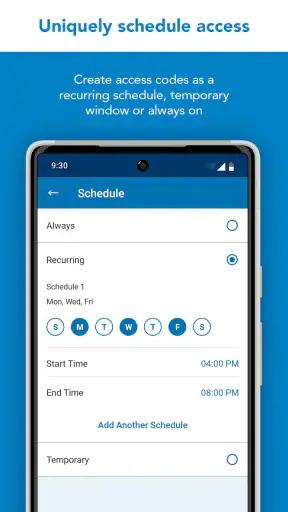
Shared access becomes easier when the household separates permanent residents from occasional visitors. A partner, roommate, or family member may need regular entry, while a cleaner, repair person, or short-term guest may only need access for a particular purpose. I would avoid giving every person the same standing authority simply because it is convenient during setup.
Before granting access, I would ask three simple questions: Does this person need entry independently? Will that need continue? Who will remember to remove or change it? Those questions sound obvious, but they are more useful than adding people quickly and trying to reconstruct the arrangement later.
For a shared home, I would also agree on a communication routine. If one person changes the lock arrangement, the others should know. If a visitor is expected, the household should be clear about who invited them and what to do if plans change. The app can sit at the center of that process, but it should not become the only source of information. A message or conversation can prevent confusion when someone is standing outside the door.
This is where the app’s focused design can be an advantage compared with a broad smart-home platform. A general home app may combine lights, cameras, thermostats, alarms, and locks in one place, but that breadth can also make a simple access task feel buried. Schlage Home is more directly tied to the lock experience. On the other hand, users who already depend on a different ecosystem may prefer keeping devices together, even if that means using a less specialized interface.
I would be cautious about using a shared household tablet as the sole control point. It may seem convenient, but it can be left unlocked, moved between rooms, or used by visitors. A personal phone provides a clearer boundary between the person responsible for access and everyone else who happens to be in the home. Convenience should not quietly turn into uncontrolled authority.
Another non-obvious trade-off is emotional rather than technical. Digital access can make it easy to change someone’s entry without a physical exchange of keys, but that does not make the change socially neutral. In a roommate situation or a relationship that is ending, I would treat access changes as a deliberate security step and communicate clearly where appropriate. The application can help implement the change; it cannot make a sensitive household decision for you.
Age, trust, and the right level of independence
The listed content rating is Everyone, which makes the app broadly suitable from an age-classification perspective. That does not mean every child should manage household entry independently. The more important question is maturity: can the user protect the phone, understand when not to share access, and contact an adult if the lock or app behaves unexpectedly?
For an older child, the app may be part of a sensible arrival routine, but I would explain the boundaries first. They should know not to lend the phone to a friend for entry, not to disclose account details casually, and not to assume that a successful screen action always means the door is physically ready. A short conversation about checking the door and reporting problems is more valuable than simply installing the application.
For younger children, I would keep control with an adult and use the app as an adult-managed tool. The fact that the app is free and rated for Everyone should not be confused with a promise of child-focused supervision. I would not assume the presence of family controls, child profiles, or age-based access rules unless the particular lock and account arrangement clearly provides them.
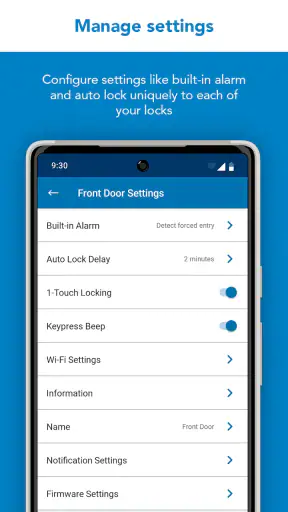
Trust also matters among adults. A household may have people who are trusted to enter but not to change the main configuration. I would distinguish between everyday use and administrative responsibility wherever the setup allows that distinction. That separation reduces the chance that a casual user will accidentally alter an arrangement that affects everyone.
Older relatives may appreciate not having to carry a traditional key, but the phone-based approach can introduce its own learning curve. I would set up the app with them in person, make sure they know which device to use, and avoid assuming that a digital process is automatically simpler. For someone who is uncomfortable with smartphones, a conventional key or a simpler entry method may remain the better choice.
Where it fits beside ordinary keys and broader platforms
The usual alternative is still a physical key. A key is inexpensive, familiar, and independent of a phone battery or application login. It can also be copied or misplaced, and changing access may require replacing or rekeying hardware. Schlage Home offers a more flexible way to think about household entry, but that flexibility comes with account management and device dependence.
I see the app as strongest for people who regularly need to coordinate access. A busy household, a property owner who wants a more organized way to manage a Schlage smart lock, or someone who dislikes passing spare keys around may find the digital approach worthwhile. The benefit is not merely novelty; it is the ability to make access part of a repeatable household process.
I would skip it if you do not own compatible Schlage hardware, dislike managing accounts, or want a lock that works exactly like a traditional key with no phone involved. I would also hesitate to recommend it as the only solution for a property where reliable entry is critical but the occupants are not comfortable maintaining phones, connectivity, and digital credentials.
Compared with a broad smart-home platform, the focused Schlage approach may feel cleaner for lock-related tasks. The compromise is that users who want one unified control center for many brands may prefer their existing ecosystem. I would choose the specialized route when the lock is the main priority and choose the broader platform when cross-device routines matter more than a dedicated lock experience.
The app has a 4.0 average from around 13 thousand ratings, with more than 6 thousand written reviews and over one million installs. Those figures suggest a well-established product with a substantial user base, but they should not replace a compatibility check or a realistic assessment of your household. A popular app can still be the wrong match for a home that wants physical keys, minimal administration, or a different device ecosystem.
Small habits that make the experience safer
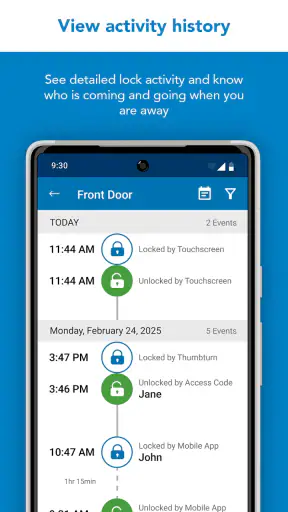
I would create a simple household record of who is expected to have access, without storing sensitive credentials in an exposed note. The point is to prevent forgotten permissions, especially after a roommate leaves or a temporary visitor no longer needs entry. Reviewing that arrangement occasionally is more useful than waiting for a security concern to force the issue.
I would also keep the app and the phone protected with the phone’s normal security features. A lock-management application deserves more care than an ordinary shopping or entertainment app because access to the account may affect a real door. I would avoid signing in on a device that belongs to someone outside the household, and I would remove old devices from the arrangement when a phone is replaced or permanently lost.
When troubleshooting, I would change one thing at a time. First check whether the physical lock works as expected, then check the phone and application, and finally examine the household’s connectivity. Resetting everything immediately can erase useful clues and create more work for the person who manages the account.
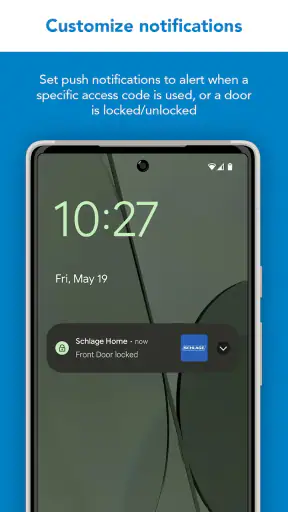
Most importantly, I would not let the app eliminate common-sense checks. After using a digital control, confirm the door’s physical state when appropriate. If a visitor is waiting outside, do not assume that a notification or screen change is enough evidence that everything went as planned. A smart lock still has a mechanical reality that deserves attention.
My household verdict
After considering how I would use it at home, I see Schlage Home as a practical companion for compatible Schlage smart locks rather than a universal home app. Its strongest role is helping a household move away from informal key sharing and toward a clearer access routine. That can be genuinely useful when adults have different schedules, visitors need controlled entry, or a property owner wants a more organized way to handle a lock.
The best experience depends on disciplined setup. Choose one responsible primary account holder, introduce other users carefully, separate regular residents from temporary visitors, and agree on how changes will be communicated. Those steps may sound like household administration, but they are exactly what makes a lock app feel dependable instead of confusing.
I would recommend the free app to someone who already has compatible Schlage hardware and is comfortable treating phone-based access as a security responsibility. The Everyone age rating makes it broadly approachable, while the mature user base and current 8.3.0 release show that it is not a brand-new experiment. Still, I would not recommend it blindly to every household.
If your priority is a simple physical key, a phone-independent routine, or one dashboard for devices from many manufacturers, another option may suit you better. If your priority is organized access around a Schlage smart lock, this is a focused choice that can earn its place in daily life. My honest recommendation is to choose it for coordinated access, not just for the novelty of opening a door with a phone.


